Chat / Slack Event
Triage Agent
Asks the right questions, spots duplicates, sizes the work and suggests a priority.
- Intake interview
- Duplicate detection
- Priority scoring
- Complexity estimation
Works with BUD Agent, Skill Agent
Your whole AI team, in one place. Each agent owns one part of building a feature. They start on their own, hand work to each other, and all work from the same up-to-date picture of your code.
Triage, specs, estimates, status updates and retrospectives are still done by hand on most teams. That is the part these agents take on.
of developers are using or planning to use AI tools in their development process, up from 76% the year before.
SourceStack Overflow Developer Survey 2025· 33,662 responses
Industry research from the sources linked above. These are not Glideship results.
The agents scope a request and write the spec, the tech plan and the test plan. Your team reviews each one.
Glideship's agents write the first draft of most steps, and people make the decisions. This is where new requests land. Requests come in from Slack. The triage agent asks the requester a few questions in the thread and checks for duplicates. Then it proposes a BUD with the reasons and the urgency.
A person makes the call: create the BUD, or reject the request with a note. When a phase is set to auto-generate, the BUD agent drafts it. This draft came from the agent, and the team edits it like any other document. If a phase is off, you can still run the agent here, write it yourself, or copy the same prompt into your own AI tool.
The tech plan agent reads the code graph from your repository scans before it writes. It looks up the functions involved and what depends on them. Then it lists tasks per repository, down to the files to change. In testing, the test plan agent writes automated end-to-end, integration and API cases.
It adds manual cases for edge conditions and failure paths. QA records the results right here. When a bug is reported, Glideship compares it with the work already in flight. A bug found in testing is linked to the closest BUD. A production bug is linked to the feature it belongs to.
Estimates come from ten thousand simulated runs per BUD. They use its complexity, the team's past cycle times and current workload, and give a date for each phase. When a BUD closes, the learning agent can write a short retrospective. This page adds them up, so you can see where the days go and which stages run over.
The agents draft, and people decide.
Grouped by the part of the work they own, in the order they act on a feature.
Turn a request into a written spec.
2 agents
Asks the right questions, spots duplicates, sizes the work and suggests a priority.
Works with BUD Agent, Skill Agent
Writes the spec from your real code, your team's rules and similar past work.
Works with Triage Agent, Learning Agent
Shape the build and suggest who does it.
3 agents
Draws wireframes that use your product's own colours, fonts and components.
Works with BUD Agent, Tech Plan Agent
Turns an approved BUD into a step-by-step build plan, down to which files to change.
Works with BUD Agent, Design Agent
Suggests the best developer for the job by skills, workload and who knows the code.
Works with Skill Agent, Tech Plan Agent
Keep the board true without status meetings.
2 agents
Watches pull requests, moves each BUD forward when code merges, and keeps everyone posted.
Works with Learning Agent, Bug Linker Agent
Writes the daily standup from commits, pull requests, bugs and chat, and flags risks early.
Works with Status Agent, Bug Linker Agent
Test the work and send bugs back to the right place.
3 agents
Writes automated tests and manual test cases from the BUD's acceptance criteria and the code.
Works with BUD Agent, Bug Linker Agent
Connects each new bug to the feature it came from, and calls for help when bugs pile up.
Works with Reassignment Agent, Status Agent
Sends the developer back to review bugs, moves QA on to the next BUD, keeps workloads even.
Works with Bug Linker Agent, Skill Agent
Learn from every release and keep the team sharp.
3 agents
Writes the retrospective, compares estimates with reality, and remembers the lessons.
Works with Skill Agent, BUD Agent, Triage Agent
Keeps skill profiles current and warns when only one person knows a part of the code.
Works with Triage Agent, Learning Agent, Reassignment Agent
Turns your own features into a daily team quiz, so everyone keeps up with what you've built.
Works with Learning Agent, Skill Agent
An event, a phase gate or a schedule. A Slack message, a merged pull request, a new bug or the morning standup.
Every agent reads the same picture of your code. That picture is re-learned on every pull-request merge to your main branch.
What comes out is a draft. A person reviews it, changes it if needed and decides what happens next.
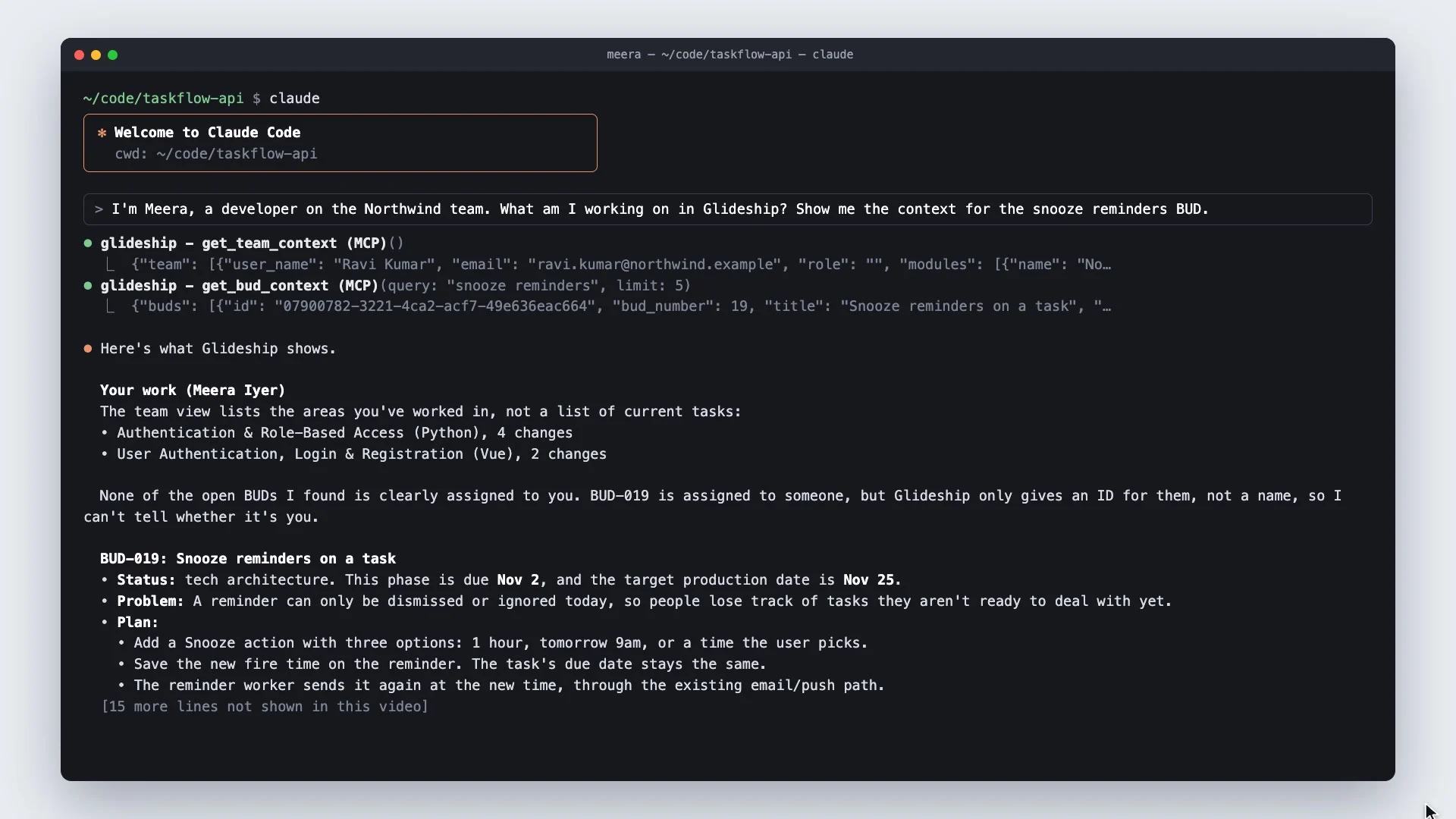
Your coding assistant reads BUDs and team context from Glideship over MCP, right where you write the code.
Glideship runs its own MCP server, so your AI tools can work with the same BUDs your team sees. This page shows how to connect them. Most tools only read. The ones that write are limited. You can only update a BUD you are assigned to, and every change is recorded in its history.
There are ready-made settings for desktop and editor clients, and example prompts for writing a spec or a tech plan with your own AI. For Claude Code, each developer creates a personal token here. It is shown once. You export it in your shell, and Claude Code then works as you.
Repositories set up by Glideship carry a small MCP config, so Claude Code picks up the Glideship tools when it starts in that folder. Meera asks about the BUD she is picking up. Claude Code reads it from Glideship, with the requirements and the plan, instead of guessing from the code alone.
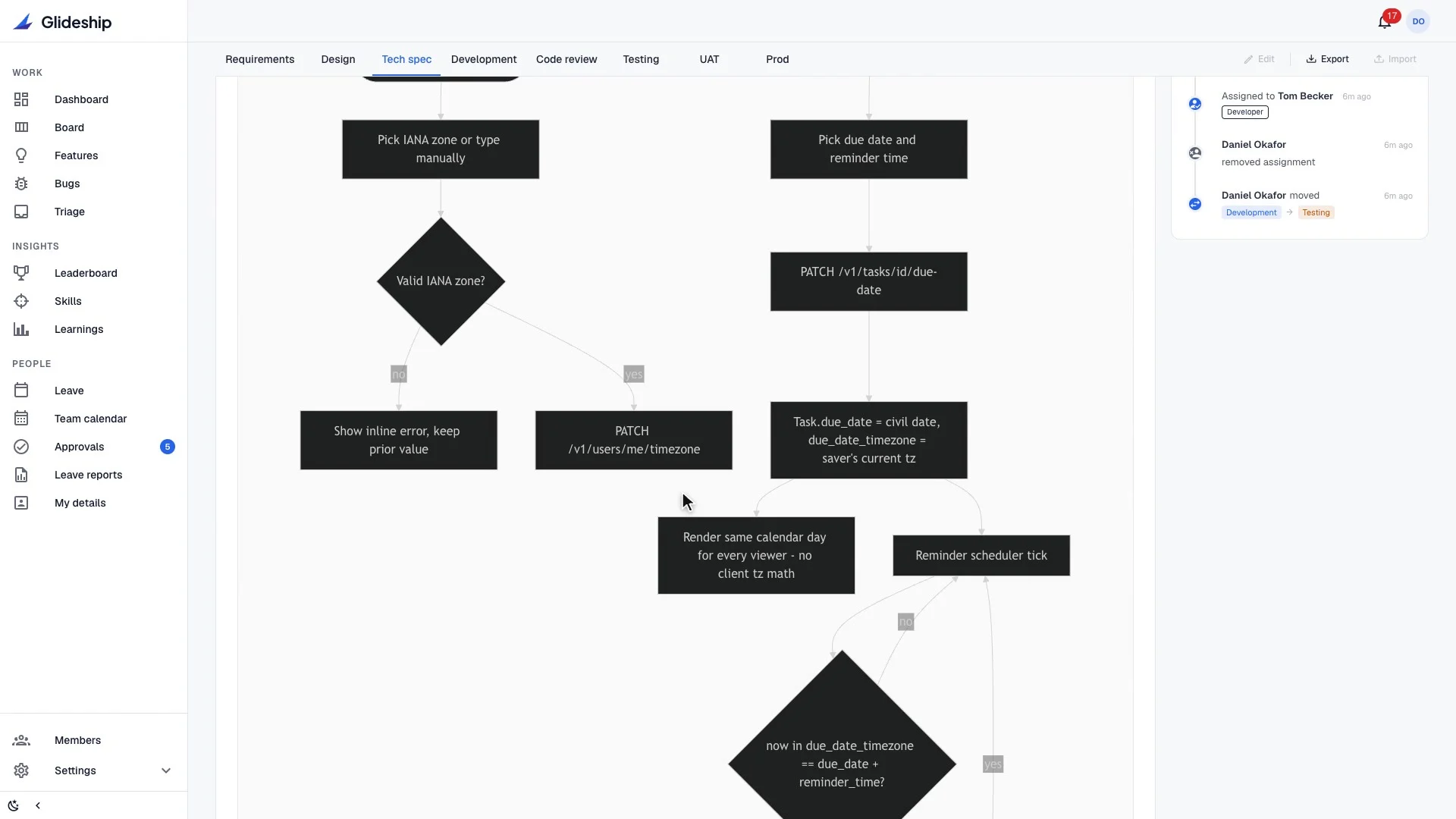
Before planning a change, it asks the code graph where the relevant code is, what calls it, and what else a change might affect. When she is happy with the draft, it writes the tech spec back to the BUD. It only touches the section the current stage owns. Back in Glideship, the new spec is there, with a history entry for the change.
Glideship is open source and self-hosted, and your AI tools work from the same source of truth as your team.
One command. Needs Docker and Node.js 18 or later. Your code and data stay on your machine. npx glideship init